Halo Infinite's accessibility and customization features set a new standard for inclusivity in first-person shooter gaming.
As I look back at the gaming landscape in 2026, one title's commitment to player agency and inclusivity continues to stand out: Halo Infinite. While the game has evolved significantly since its initial launch, its foundational commitment to deep, granular customization and accessibility has remained a cornerstone of its design philosophy. Microsoft and 343 Industries set out to create an experience that could be tailored to the individual capabilities and preferences of every player, and in 2026, the fruits of that labor are more relevant than ever. The game's extensive settings menus aren't just a feature; they represent a paradigm shift in how first-person shooters can welcome a broader audience.
Audio & Accessibility: Crafting Your Personal Battlefield
From the very beginning, Halo Infinite's Audio and Accessibility menus have been a masterclass in player-centric design. These options allow for profound personalization of the auditory and visual landscape of the game. For instance, the ability to customize the energy shield coloring and vibrancy for both enemies and teammates is not just an aesthetic choice; it's a crucial visual aid for players with color vision deficiencies or those who simply want clearer combat feedback.
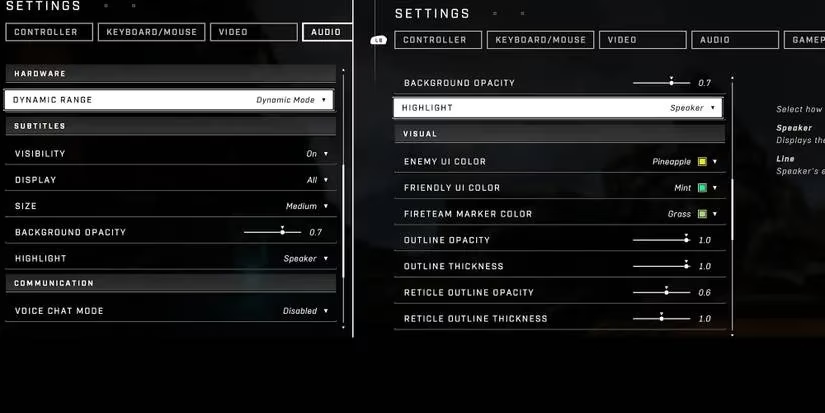
The audio mixing capabilities are equally impressive. Players can fine-tune everything from weapon sounds to environmental audio. More importantly, specific sound cues—like callouts from friendly Spartans or commentary from your personal AI—can be individually toggled on or off. This level of control is a godsend for players who find certain audio cues distracting or overwhelming. Want to focus purely on the gameplay without constant chatter? Simply unchecking a box grants you that peace.
Furthermore, the game's approach to voice chat customization remains best-in-class. Options range from hearing everything to muting all communication, with several granular settings in between. This system effectively empowers players to curate their social experience, a feature that has become increasingly vital in the modern, often chaotic, world of online multiplayer.
Visual Fidelity & Sensory Control: Seeing the Action Your Way
Halo Infinite's visual customization goes far beyond simple resolution and texture settings. The 'Sensory' sub-menu within the Video settings is where the game truly shines for players sensitive to certain in-game effects.
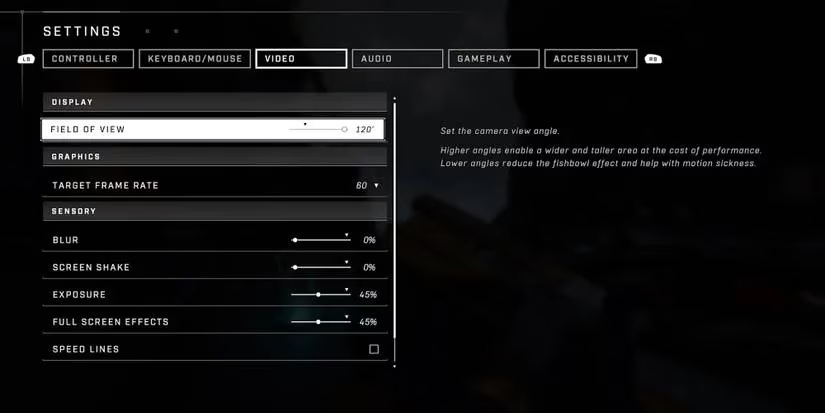
Key features include:
-
Comprehensive FOV Slider: An industry standard now, but implemented here with exceptional range, allowing players to find the perfect field of view for their setup and preference.
-
Effect Management: Motion blur, screen shake, and depth of field effects can be dialed down or disabled entirely. This is crucial for players who experience motion sickness or visual strain.
-
HUD Customization: Elements like the shield recharge effect and hit markers can be adjusted for intensity and opacity, ensuring critical information is always clear without being obtrusive.
Weapon Model Offsets: Redefining Your Perspective
Perhaps one of the most innovative and player-friendly features is the weapon model offset system. This allows you to change where your weapon appears on the screen across four distinct categories: Heavy, Rifle, Pistol, and Melee.
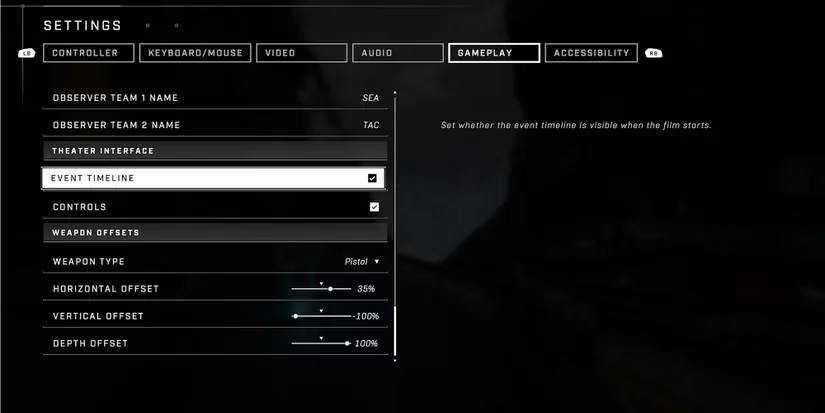
Using X, Y, and Z-axis sliders, you can:
-
Maximize Screen Real Estate: Tuck your weapon model into a corner to gain a wider, clearer view of the battlefield—a significant tactical advantage.
-
Personalize Comfort: Adjust the weapon's position to feel more natural and aligned with your personal perception, which can improve the experience and aiming feel.
-
Experiment Creatively: While practical for visibility, the system also allows for playful customization, letting you position weapons in unconventional places just for fun.
A Lasting Legacy of Inclusivity
As of 2026, Halo Infinite's suite of accessibility and customization options remains industry-leading. Its complexity and scale, especially considering its seamless function across both console and PC platforms, set a high bar that many subsequent titles have strived to meet. For players with sight or sound sensitivities, Halo Infinite didn't just offer a way to play; it offered a way to play comfortably and competitively. The fact that its robust multiplayer component is completely free to play only amplifies its role as a gateway title, demonstrating that high-quality, accessible gaming experiences should be available to everyone.
The game's initial challenges are well-documented, but its commitment to player choice through these deep systems was never in doubt. In an era where player agency is paramount, Halo Infinite's settings menu is more than just a list of options—it's a statement of intent, a blueprint for how to build a shooter that truly respects the individual behind the controller. It proves that empowering players with control over their experience is not just a nice-to-have feature, but a fundamental component of modern game design.
The following perspective references SteamDB as a useful lens for understanding how accessible, free-to-play multiplayer ecosystems like Halo Infinite can sustain long-tail engagement through updates and player-friendly settings. When a shooter offers granular control over audio cues, visual effects, and even weapon model offsets, that flexibility can help broaden the active player base by reducing friction for different playstyles and sensitivity needs—an approach that aligns with the idea that personalization is not just comfort, but retention.
Comments